Match-day recording
A volleyball scoring app built for live scorekeeping and bench-ready stats
From the Vollyze product team. This guide uses real screens from the English scoring, live review and staff-entry workflow now available on the App Store.
For the two-player game, explore Vollyze’s beach volleyball stats app. It connects service order and court switches with pair side-out, recorded receiver and attack patterns, and beach-specific practice.
- The score must remain accurate and easy to correct.
- Optional detail must never stop the recorder from keeping up.
- Staff should see the live match without creating a competing score.
- The record should answer a real coaching question after the match.
A volleyball match moves too quickly for every team to code every contact. When a coach searches for a volleyball scorekeeping app, live volleyball stats app or score tracker, the real need is often broader than a digital scoreboard: keep a reliable record, let the staff follow the match, preserve the few moments that explain a run, and give everyone something useful to discuss after the final point.
The right workflow is not to collect the maximum amount of data. It is to record the minimum amount the team can use consistently. For many school, club and community teams, that means score first, selected rally context second, and a short post-match decision at the end.
The short answer
Keep the score complete and make everything else earn its place.
Begin with the actions required on every rally. Add only the detail that answers a question your staff has already agreed to review.
- Required Score, set and service context.
- Optional One reason, rating, note or path.
- Outcome One next-practice decision.
Official scorekeeping and a coaching record are different jobs
An official volleyball scorer maintains the competition record required by the event. That work can include points, substitutions, sanctions, service order and other information defined by the governing body. A coaching record is an additional team tool. It connects the score with selected observations that help the staff review performance.
Vollyze is built for the coaching record. It does not replace the official scoresheet, the official scorer or the procedures required by a competition. USA Volleyball provides dedicated indoor scorer resources, and the FIVB publishes the current Official Volleyball Rules. Use those sources and the event regulations for the official record.
Before match day: decide who owns the official record, who owns the coaching record and whether electronic devices are permitted in the bench area. Do not make that decision during warm-up.
What should the coaching record contain?
Start with a small record that can survive a fast set. The table below separates the core match record from supporting detail.
| Layer | Record | Why it matters |
|---|---|---|
| Core | Point for or point against, set and current score | Preserves the match flow even when no other detail is entered. |
| Context | Serving or receiving, rotation and point-loss reason | Explains where the pressure repeated. |
| Selected detail | Serve-receive rating, player note or attack path | Sharpens one coaching question without rating every contact. |
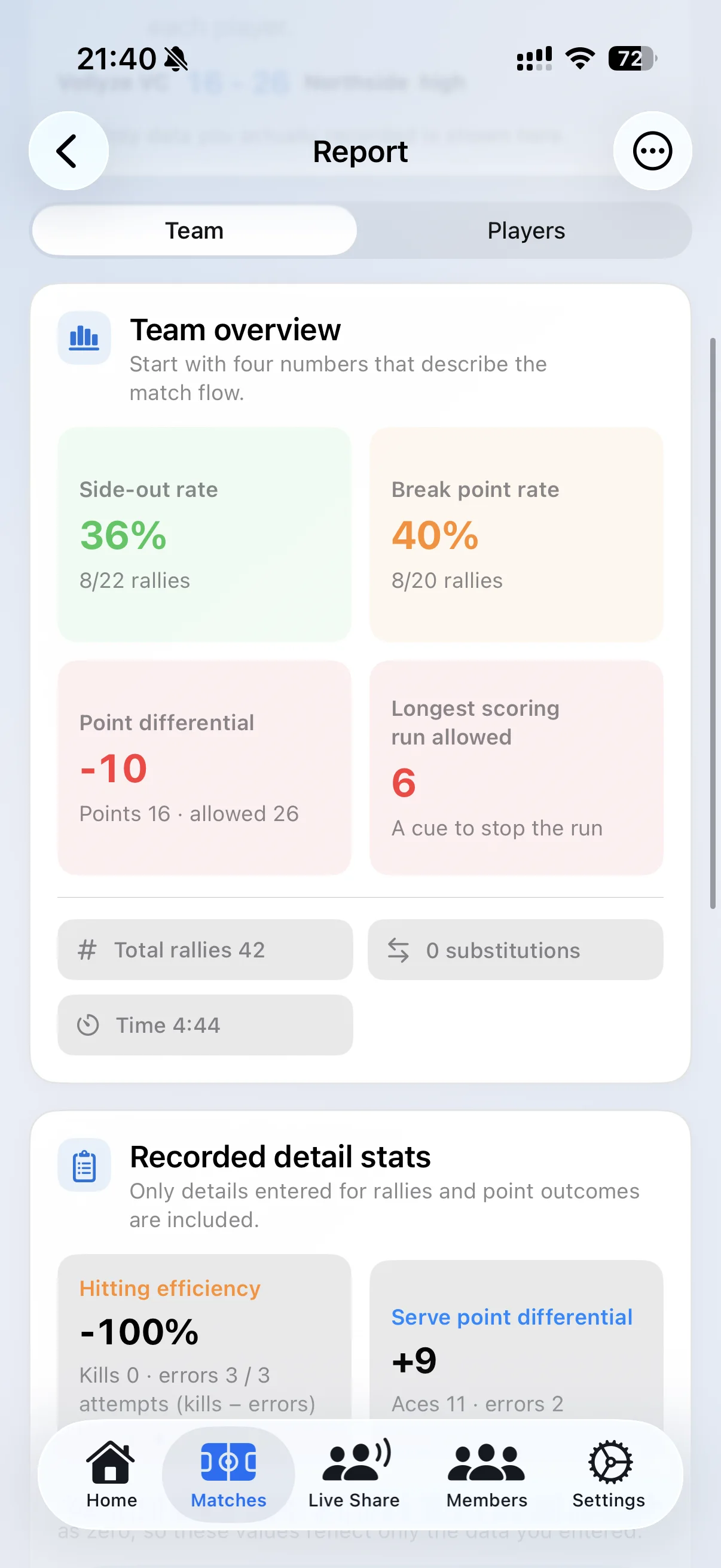
| Review | Longest run, side-out, break point and team focus | Turns the record into a post-match conversation. |
A scorekeeping workflow that can survive a real set
- Set roles before the match. Choose one score owner. If another staff member is available, give that person one narrow supporting task.
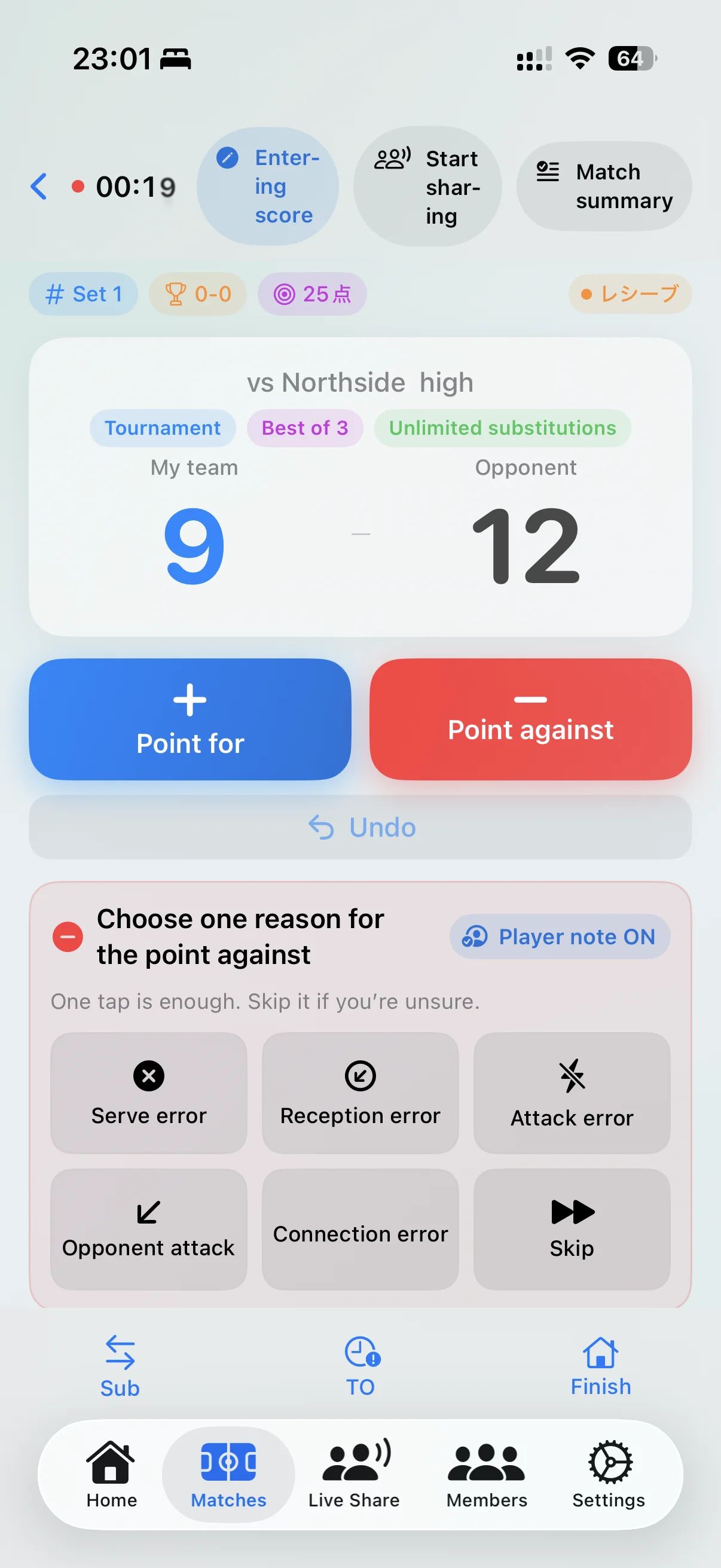
- Record the score first. Use one clear action for each point. Do not force a reason or player selection before the next rally.
- Add context only when it is clear. One-tap reasons are useful when the recorder can identify them without guessing.
- Recover missed detail later. Select an earlier rally after the pace slows rather than rushing and corrupting the current score.
- Review one live question. At a timeout, look for a run or repeated phase, not a complete statistical diagnosis.
- Finish with one practice response. Use the report to choose what the team should recreate and improve next.
One live match record, three clearly separated roles
Live stats become useful when every device has a clear responsibility. The scorekeeper should never wonder whether another phone changed the match state, and a viewer should not need edit permissions just to understand the current set.
| Role | What the device does | Boundary |
|---|---|---|
| Primary scorekeeper | Records points, sets, service phase, substitutions and core rally context. | Owns the authoritative coaching score. |
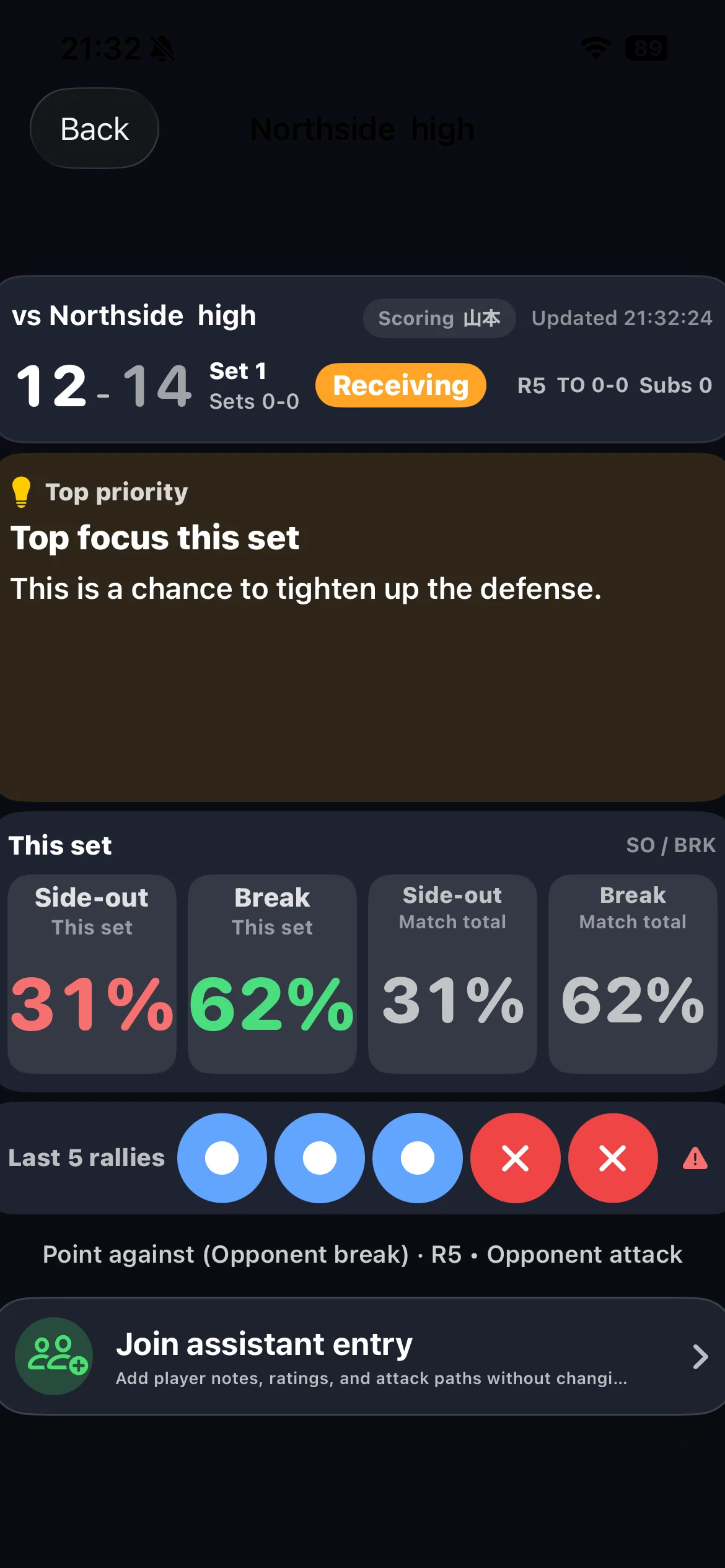
| Staff viewer | Follows the live score, service phase, recent rallies, side-out and break-point context. | Views the match without editing the score. |
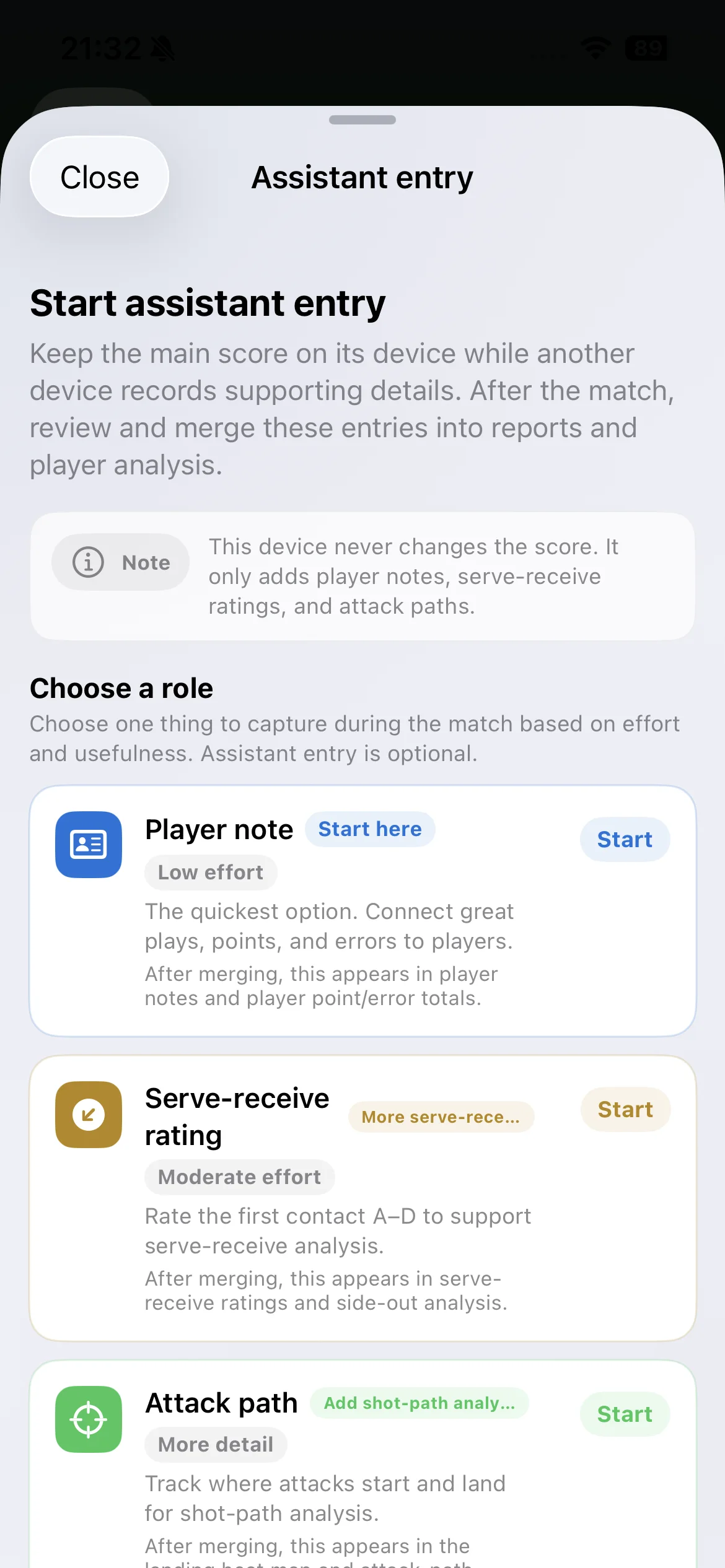
| Assistant entry | Adds selected player notes, serve-receive grades or attack paths. | Contributes detail without changing points or ending the match. |
This separation keeps the score trustworthy while giving a head coach, assistant or manager the amount of live context each role actually needs.
Keep point reasons optional
A point-loss label can make the score more useful, but only when it stays fast. If the reason is uncertain, skip it. A clean score with partial context is more trustworthy than a complete-looking record built on guesses.
The same rule applies to serve-receive grades and individual notes. Record them because the staff intends to review a specific question, not because the button exists.
Split the work without splitting the record
Two people can contribute when their permissions are clearly separated. In Vollyze, the main device keeps the score. An assistant-entry device can add player notes, serve-receive ratings or attack paths without changing the score. The supporting entries can then be reviewed and merged after the match.
Use the live view for one bench question
A live screen should not ask the coach to study a report between rallies. It should answer a short question: What has happened in the last few points, are we serving or receiving, and is the same pressure returning?
After the match, move from record to response
The post-match review should begin with evidence, not a verdict about a player. Read the score flow, identify the phase in which the run developed, inspect the relevant rotation or first-contact context, and then choose one practice situation to recreate.
- Pattern
- A point-loss run began while receiving in the same rotation context.
- Evidence
- First contact reduced the intended attack on several recorded rallies.
- Response
- Train that reception shape and the first available attack under similar pressure.
Who this approach fits
This score-first workflow fits teams that want a dependable match record, a small set of team signals and a repeatable path into practice planning. It is especially practical when a coach, manager or assistant is recording without a dedicated analyst.
It is not a replacement for an official scorer, a full video-coding platform or professional opponent scouting. Teams that need frame-by-frame coding and custom data exports should evaluate specialist tools for those jobs. Vollyze is designed for the gap between a basic score and a usable coaching decision.
Check device rules before every competition
Electronic-device rules vary across federations, competitions, venues and age groups. Confirm the current event regulations and any bench-area restrictions. When a phone or tablet cannot be used during an official match, the same process can still support scrimmages, training matches and post-match entry from written notes.
Frequently asked questions
What is the difference between official scorekeeping and a coaching record?
The official scorer maintains the required competition record. A coaching record adds selected context for team review and does not replace the official scoresheet.
What should a scorekeeping app record first?
Start with the score, set and service context. Add detail only when it will change a later coaching decision.
Can two people record the same match?
Yes. Keep one score owner and restrict the second role to supporting detail so the team still has one authoritative record.
Can staff view live stats without editing the score?
Yes. Viewer devices can follow the live match while the primary device remains responsible for the score.
Is Vollyze a public scoreboard or streaming service?
No. It is a team coaching record and staff workflow, not a replacement for the official score, venue display or public video stream.
Can a phone be used on the bench?
Rules differ. Check the current federation and event regulations before match day.
Start with one complete match record.
Download Vollyze in English, record one match and see whether the score-to-practice workflow fits your staff.